In a monolith, calling another module is just a method call. In microservices, that module is now a separate application running somewhere on the network. Maybe on a different port. Maybe on a different machine. Maybe scaled to three instances.
So before services can talk to each other, they need to answer two questions: where is the other service? And once they find it, how should they communicate? Sometimes you need an immediate response. Sometimes you just want to publish an event and let other services react in their own time.
That’s what this article is about.
The problem with hardcoded URLs
The simplest approach is to hardcode service addresses. Customer service calls http://localhost:8002/api/v1/products. It works on your machine, until it doesn’t.
In a real environment, services scale up and down. Containers restart with new IPs. Ports change. Hardcoding breaks fast.
We need something that keeps track of what’s running and where.

Service Discovery with Eureka
That’s the problem service discovery solves. Instead of hardcoding where other services live, you give every service one job: register yourself when you start, and ask the registry when you need someone else.
In our project, we use Eureka, built by Netflix and now part of Spring Cloud. Here’s how it works:
- You run a Eureka Server, a standalone service that acts as a registry
- Every microservice registers itself on startup (“I’m the order service, running on port 8003”)
- Services send heartbeats periodically to confirm they’re still alive
- When a service needs to call another, it asks Eureka for the current address

No hardcoded URLs. If the order service scales to 3 instances, Eureka knows about all of them, and the client gets built-in load balancing for free.
Setting it up
The Eureka Server is its own Spring Boot app. One dependency, one annotation:
@SpringBootApplication
@EnableEurekaServer
public class EurekaServerApplication {
    public static void main(String[] args) {
        SpringApplication.run(EurekaServerApplication.class, args);
    }
}
And the configuration:
server:
  port: 8761

eureka:
  client:
    fetch-registry: false
    register-with-eureka: false
fetch-registry: false and register-with-eureka: false because the server shouldn’t register with itself.
On the client side (every microservice), it’s even simpler. Add the Eureka client dependency, point it to the server:
eureka:
  client:
    service-url:
      defaultZone: http://localhost:8761/eureka
Once everything starts, open http://localhost:8761 and you’ll see all registered services on the Eureka dashboard.
Now that services can find each other, how do they talk?
Not all traffic in a microservices system is the same. There are two kinds, and it’s worth knowing the difference before going further.
North-South is traffic coming from outside. A user opens your app and places an order. A mobile client calls your API. That request travels from the outside world into your system through the API Gateway. We’ll cover that in Part 03.
East-West is traffic happening inside. The Order service asking the Product service “is this item in stock?“. The Payment service telling the Notification service “send a receipt”. No user sees this — it’s services talking to each other behind the scenes.
This article is about East-West. And for that, we use two patterns:
- Synchronous: one service calls another and waits for a response
- Asynchronous: one service sends a message and moves on, without waiting

Let’s look at each one.
Synchronous Communication
Sometimes a service needs data from another service right now. For example, the Order service needs to check if a product exists before creating an order. That’s a synchronous call: send a request, wait for the response.
Spring gives you a few options: RestTemplate (on its way out), WebClient (reactive), and OpenFeign (declarative). In our project, we chose OpenFeign. Look at the same call written three ways and you’ll see why:
RestTemplate:
ResponseEntity<CustomerDTO> response = restTemplate.getForEntity(
    "http://customer-service/api/v1/customers/{id}",
    CustomerDTO.class, customerId
);
WebClient:
CustomerDTO customer = webClient.get()
    .uri("/customers/{id}", customerId)
    .retrieve()
    .bodyToMono(CustomerDTO.class)
    .block();
OpenFeign:
@FeignClient(name = "order")
public interface OrderClient {
    @PostMapping("/api/v1/orders/add")
    OrderResponse createOrder(@RequestBody OrderRequest orderRequest);
}
With OpenFeign, you write a Java interface. That’s it. Spring finds the service through Eureka, builds the HTTP request, and handles the response. No URL building, no HTTP client setup.
Centralized Feign clients
One thing we did early: put all Feign client interfaces in one shared feign-clients module.
demo-microservices/
├── feign-clients/
│   └── src/main/java/dev/nano/clients/
│       ├── customer/
│       ├── order/
│       ├── product/
│       ├── payment/
│       └── notification/
Any service that needs to call another just imports this module. No duplicated code, one place to update.
Asynchronous Communication: Event-Driven Messaging
Not every call needs an immediate response. When a customer places an order, they don’t need to wait for the confirmation email to be sent before seeing “Order placed”.
This is where a message broker comes in.
Why not just call the service directly?

Imagine our Notification service uses AWS SES for emails. AWS has an outage. It happens. Without a broker, any notification sent during that time is just gone.
With a message broker sitting in the middle, producers publish messages to a queue. If the Notification service is down, messages wait. When it comes back, it processes them one by one. Nothing lost.
AMQP — the protocol behind it
Before jumping into RabbitMQ, it’s worth knowing about AMQP (Advanced Message Queuing Protocol). Think of it as the language that message brokers and clients use to talk to each other — it defines how a message is packaged, sent, and confirmed.
You don’t write AMQP manually. Spring handles it for you under the hood. But knowing it exists helps you understand why things like acknowledgements and routing work the way they do.
In simple terms, AMQP gives you three things out of the box:
- Acknowledgement: when a consumer receives a message, it sends back a confirmation. If it doesn’t, the broker knows something went wrong and can retry.
- Routing: you can send one message and have it go to different queues depending on rules you define. That’s what the exchange and binding are for.
- Decoupling: producers don’t know who is consuming their messages, and consumers don’t know who published them. They just talk through the broker.
Brokers available in the market
AMQP is a protocol, not a product. Several brokers implement it, each with different strengths:

In our project, we went with RabbitMQ. It’s lightweight, easy to run locally with Docker, integrates cleanly with Spring Boot, and handles our event-driven flow without any overhead.
How it works in our project
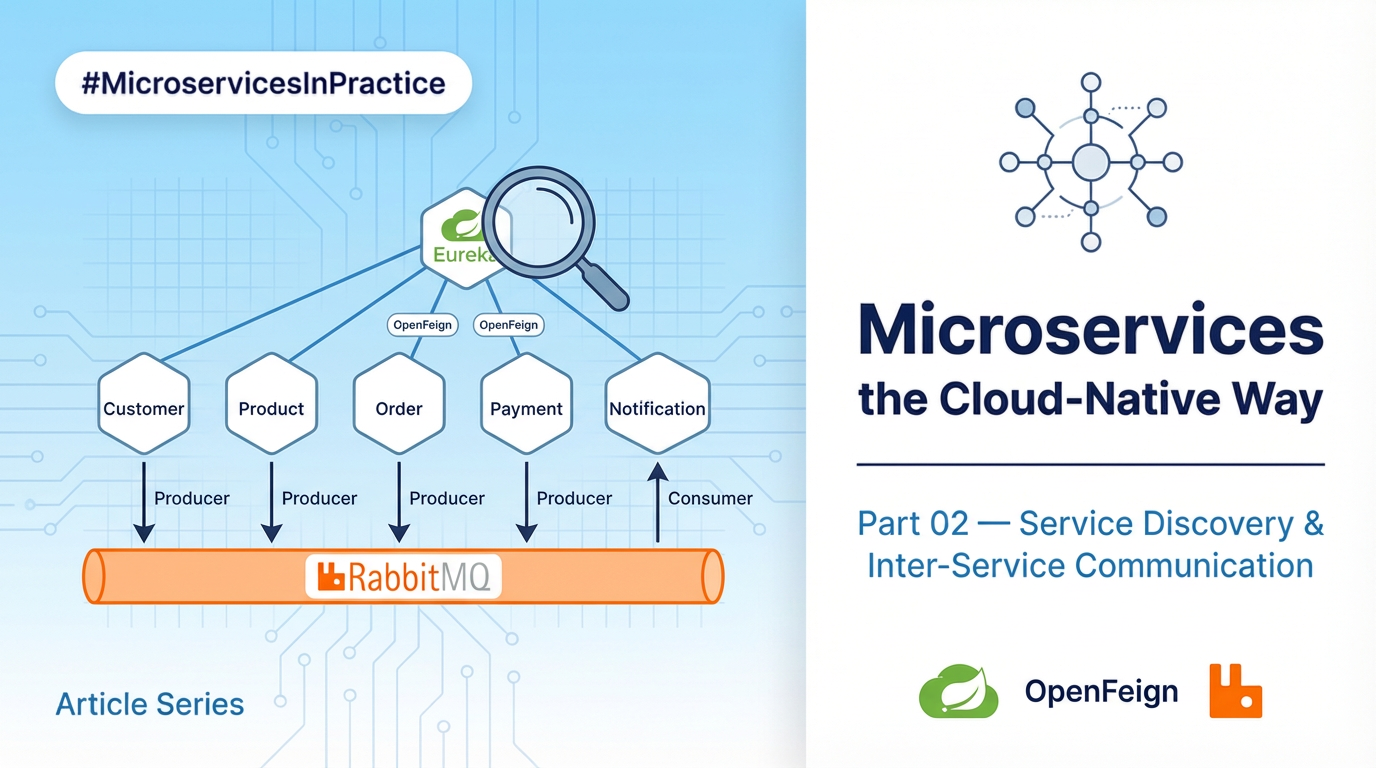
In our platform, whenever something important happens — a customer signs up, an order is placed, a payment goes through — the service responsible for that action publishes an event to RabbitMQ. The Notification service is always listening and picks it up to save the notification and send the email.
- Producers: Customer, Product, Order, and Payment services
- Consumer: Notification service

Here’s what the RabbitMQ configuration looks like. We define a queue, an exchange, and a binding that connects them:
@Configuration
public class RabbitMQConfig {
    @Bean
    Queue notificationQueue() {
        return new Queue("notification.queue");
    }

    @Bean
    TopicExchange internalExchange() {
        return new TopicExchange("internal.exchange");
    }

    @Bean
    Binding binding() {
        return BindingBuilder
            .bind(notificationQueue())
            .to(internalExchange())
            .with("internal.notification.routing-key");
    }
}
Three simple concepts to keep in mind:
- Exchange is the entry point. Producers don’t send messages directly to a queue, they send them to the exchange.
- In a real system you’ll have multiple queues: one for notifications, one for billing, one for analytics…
- The exchange receives the message, but it’s the binding that tells it where to send it.
- Queue is where messages wait. If the consumer is busy or down, messages sit here until they’re processed.
- Binding is the routing rule. It connects the exchange to a queue and says: “messages with this routing key go here.” That’s what makes the whole flow work.
The producer is a simple wrapper around Spring’s AmqpTemplate. Any service that wants to publish a message calls it:
@Component
public class RabbitMQProducer {
    private final AmqpTemplate amqpTemplate;

    public void publish(String exchange, String routingKey, Object payload) {
        amqpTemplate.convertAndSend(exchange, routingKey, payload);
    }
}
On the consumer side, the Notification service picks up the message, saves it, and sends the email. If SES is down, the message stays in the queue. No data lost.
Wrapping up
Services need to find each other before they can talk. Eureka handles that, and that’s Service Discovery in action.
Once they can, the conversation goes two ways. Synchronous when a service needs a direct answer, where OpenFeign makes that simple. Asynchronous when it doesn’t, so services publish events and other services react. That’s event-driven communication: no direct call, no waiting, and RabbitMQ makes sure nothing gets lost even when part of the system is down.
All of this is East-West traffic. Internal. Hidden from the user.
The outside world is a different story. That’s North-South, and that’s exactly where the API Gateway takes over in Part 03.
Resources
- Full guide: miliariadnane.gitbook.io/demo-microservices
- GitHub: github.com/miliariadnane/demo-microservices
Next — Part 03: API Gateway — Routing, Load Balancing & Resiliency. The single entry point for all traffic, and what happens when things go wrong behind it.